WeTransfer for photographers: when a transfer isn't enough
By xolqy.com · Published
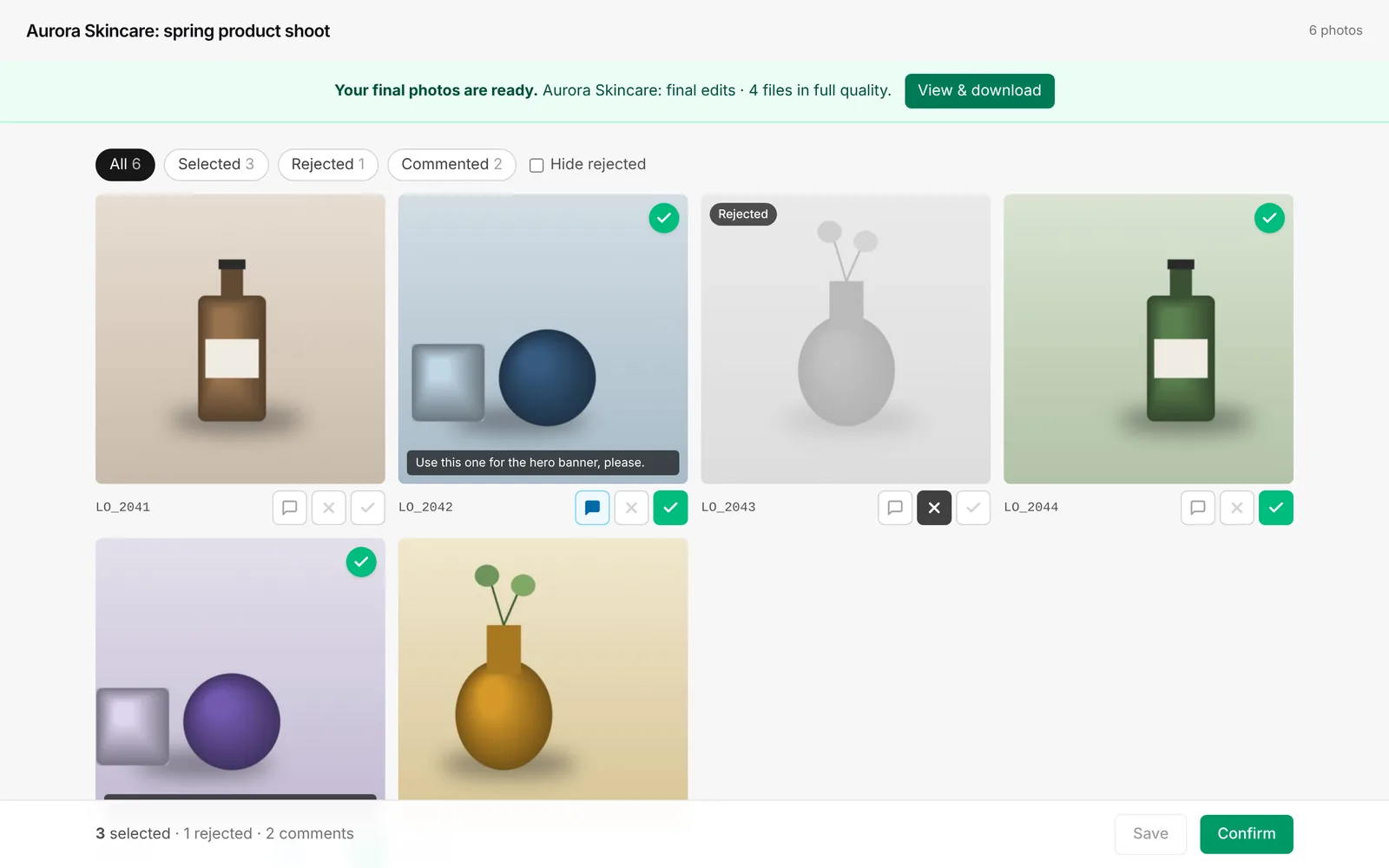
WeTransfer moves files from A to B; it doesn't help a client choose. If you send proofs by WeTransfer, the client downloads a ZIP, opens hundreds of files and emails you a list of filenames. A proofing gallery lets them select or reject photos, comment and confirm in the browser. Use WeTransfer for final delivery of large files; use a proofing tool for the selection.
Checked October 2026. Prices and features of WeTransfer come from their public pages on that date and can change. Always confirm on WeTransfer's site. We make photoproof.io, so read this as a vendor comparison, not a neutral review.
The short answer
Plenty of photographers start out sending proofs with WeTransfer, Google Drive or Dropbox. It works for moving files, but the selection then happens somewhere else, usually in a messy email: “IMG_4821, 4822 maybe, not 4830, the one where grandma is laughing…”
A proofing gallery moves the selection into the photos themselves. That’s the whole idea behind photoproof.io.
WeTransfer vs a proofing gallery
| photoproof.io | WeTransfer | |
|---|---|---|
| Purpose | Client selection and approval | Sending files |
| Free plan | 2 GB of storage, galleries live for 30 days | 10 transfers or 3 GB per rolling 30 days; free transfers last up to 3 days |
| Client needs to download first | No, they view in the browser | Yes |
| Select / reject per photo | Yes | No |
| Comments on a photo | Yes | No |
| Final confirmed list | Yes, copy-ready filenames in your dashboard | No, the client emails you |
| Password | Yes | Yes (WeTransfer added password protection to all plans in its 2025 plan update) |
| Watermark on proofs | Burned into the images | No |
| Lock downloads | Yes | Not applicable, the point is to download |
| Large final delivery (many GB, RAW) | Not designed for it | Yes, especially on paid plans (Ultimate: up to 1 TB per transfer) |
WeTransfer limits from WeTransfer’s help centre and blog, checked October 2026. For paid plan prices see wetransfer.com.
Why transfers are a poor proofing tool
- Downloads before decisions. Your client has to download a ZIP, unzip it and browse files in their OS photo viewer, often on a phone.
- Filenames as the interface. Clients have to write down filenames, and they make typos.
- No structure. “Maybe” isn’t a decision, and you can’t tell whether they looked at every photo.
- Short links. Free WeTransfer links last up to 3 days, which is often shorter than a client’s decision time.
- Full-size files leave your hands before the client has paid for or chosen anything.
Where WeTransfer is the right tool
- Sending final, full-resolution files or RAWs to a retoucher, agency or printer.
- One-off large files, especially with paid plans (unlimited transfers on Ultimate).
- People who simply need the files and don’t need to choose.
A better workflow
- Export web-sized JPEG proofs and upload them to a free photoproof.io gallery.
- Turn on the watermark and lock downloads if you want to protect the proofs.
- Send the link. The client selects or rejects photos, comments and presses Confirm.
- Copy the selected filenames from your dashboard into Lightroom and edit only those.
- Deliver the finals however you like, including WeTransfer.
More detail in how to let clients choose their photos.
Related
Watch it in 30 seconds
How to Send Photos to Clients (Without Transfer Links)
Transfer links expire, clients lose them, and you end up re-sending. Upload the gallery to photoproof.io and send one link: your client opens it on their phone (no account), selects favourites, rejects the rest and leaves notes. Finals download as single photos or one ZIP.
Frequently asked questions
What are WeTransfer's free plan limits?+
According to WeTransfer's help centre in October 2026, the Free plan allows up to 10 transfers or 3 GB in total in any rolling 30-day window, and free transfers stay available for up to 3 days.
Can clients choose photos in WeTransfer?+
No. WeTransfer delivers files; it has no favourites, approvals or comments per photo. Clients have to download and tell you their choice separately.
Should I stop using WeTransfer?+
Not necessarily. WeTransfer is still handy for sending large final files or RAWs to another professional. Just don't use it as your proofing step.